

This documentation is left here for reference only.
Please make an arrangement first before enabling forwarding with my system.

Flags need to be set for you, links need to be coordinated- otherwise it won’t work.

73
PE1RRR
Setting Up A BBS Account
Using the HTTP interface for BPQ, navigate to your own main Node Menu to “Mail Mgmt”

You may be presented with a login request, log in with your BPQ BBS SYSOP Telnet user and password (configured in bpq32.cfg where the port with DRIVER=TELNET is defined)

Navigate to the Users Page
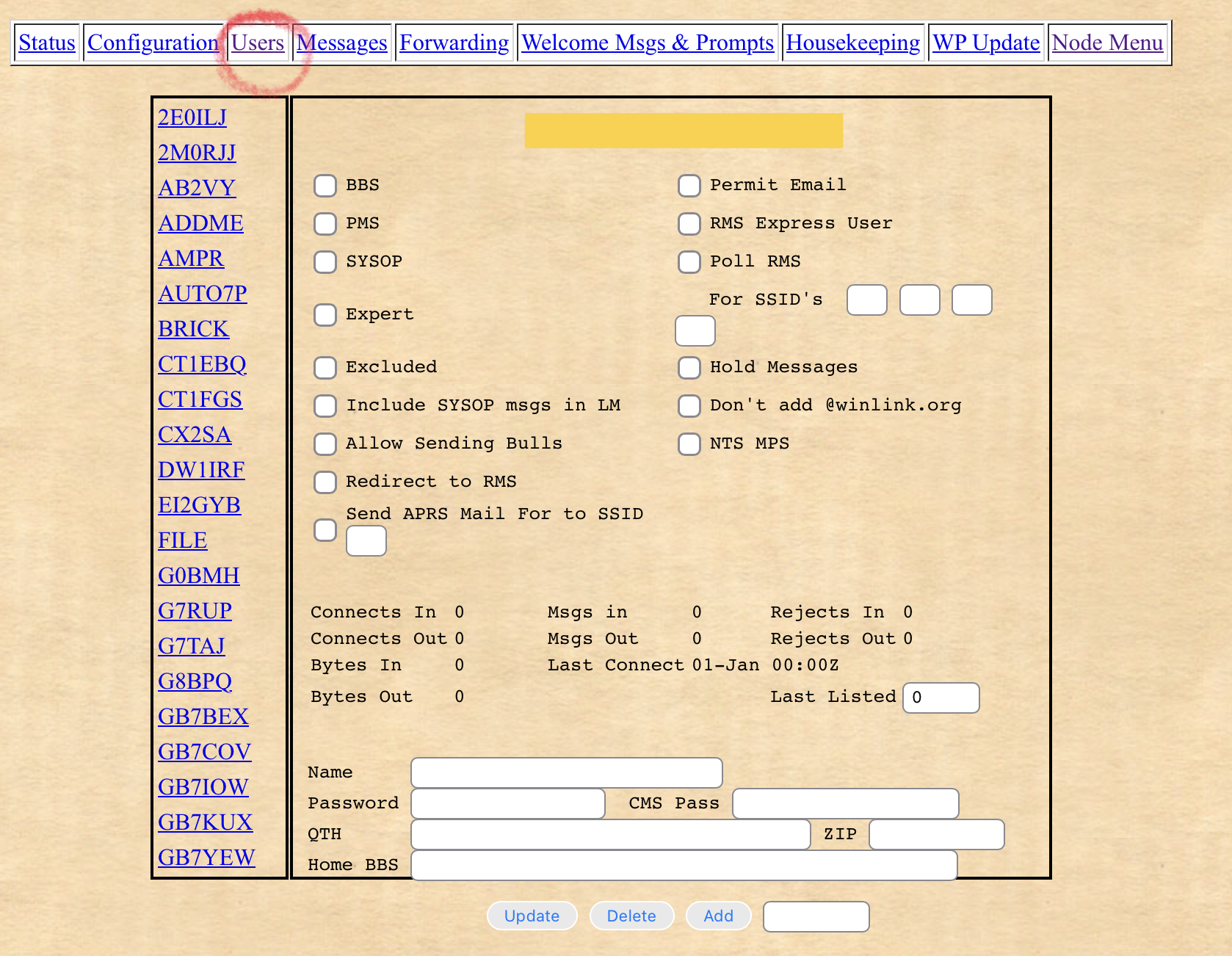
Check the list of callsigns on the left hand side to see if PE1RRR has already logged into your BBS before. If so there will be an account we can modify.
If there is no such user account, create the new user account by entering PE1RRR the very bottom field and then click ADD.

The page should refresh, if not, click the Users link again. There should now be PE1RRR displayed in the user list on the left hand side.

Select PE1RRR, then enter/verify the following settings:
| BBS | ON |
| PMS | OFF |
| SYSOP | OFF |
| EXPERT | User Set/ON |
| EXCLUDED | OFF |
| Include SYSOP messages in “LM” (list mine) | OFF |
| Allow Sending Bulls (bulletins) | ON |
| Redirect to RMS | OFF |
| Send APRS Mail For [beacon] to [the] SSID [of user] | OPTIONAL/OFF |
| Permit Email | OFF |
| RMS Express User | OFF |
| Poll RMS | OFF |
| [Poll RMS] For SSIDs | All 3 Empty |
| Hold Messages | OFF |
| Don’t add @winlink.org | OFF |
| NTS MPS | OFF |
| Last Listed | N/A |
| Name | Red |
| Password (used for webmail login) | N/A |
| CMS Pass (used for retrieving winlink.org mail) | N/A |
| QTH | Rijen |
| ZIP | 5120AA |
| Home BBS | PE1RRR.#NBW.NLD.EURO |
Forwarding
Navigate to the “Forwarding” page.

Select PE1RRR from the list on the left hand side.

All of the fields on this screen are explained below so you won’t need to squint to get the information 🙂
The TO box
PE1RRRThe TO field is the fallback for when hierarchical routing doesn’t work, such as when the BBS user sends a mail for callsign PE1RRR without the full route address.
The AT box
PE1RRR
ARRL
ARL
AMSAT
NLDNET
The AT field is the fallback for when hierarchical routing doesn’t work, such as when the BBS user sends a mail AT / @PE1RRR without the full route address.
The TIMES box
Leave blankThe TIMES field lets the polling intervals enabled in the configuration only function during these defined time bands. This is not needed here as we are online 24/7 via AXIP.
For those looking to configure time-sensitive connections perhaps with another BBS over RF, then you may be interested to know that TIME bands can also be integrated into the connection script itself. See Documentation.
Connection Script
C PE1RRR-7
BBS
The node PE1RRR-7 MUST be in your node table for this to work.
- If you have just linked to the node, wait at least 30 minutes for the BBS callsign to appear in your node table, if it does not, see My Node Table Is Full.
- Here is additional documentation that expands on how connect scripts work.
Hierarchical Routes (Flood Bulls):
NLD.EURO
WW
HR (Personals and Directed Bulls)
Hierarchical Routes for Personal Mail and Directed Bulletins.
Important: Be super careful not to add any blank white-spaces (invisible gaps) after these lines, make sure to backspace at the end of each line if you have copied and pasted, to be certain. If your bulletins aren’t forwarding, this is one of the things to look for.
PE1RRR.#NBW.NLD.EUROAdditional routes: For informational purposes only
Please do not copy and paste this list into your configuration!
Below are the hierarchical address routes that PE1RRR can route to, you may if you absolutely *need to* use some of them to route to some of these destinations via my system under the HR (Personals and Directed Bulls).
In the situation where my link is your only “in” to the packet network (it happens), you will need to route all mail via PE1RRR by putting “WW” in the HR Personal and Directed Bulletin list. This is only to be done if you have no other links at all, otherwise this breaks things.
“WW” for world-wide is automatically assumed at the end of a normal HR e.g PE1RRR.#NBW.NLD.EURO.WW
Please get in touch first to arrange a few tests with me so that we can both ensure that any additional routes you want to use do not go haywire and break routing for mail that is not meant to leave your own area. This is particularly important when you have other systems linked to your BBS that you forward mail with.
It is unusual for systems inside the USA to route an entire state’s messages (e.g TX.USA.NOAM) outside to a foreign system for distribution. In this particulcar case, I have made sure that a Texan BBS I have a link to can route the entire state of Texas’s messages for me- so I can use the widest scope TX.USA.NOAM for Texas in my configuration to route any errant/misrouted/destined messages to where they need to go. What the Texas sysop does with those messages is upon them after they have left my system.
Note: This list is not a list of routes where I want messages to come from, its meant for return only- destinations where I will send mail onwards to-
Again, please do NOT copy and paste this into your own configuration- it will break things.
M5MPC.#16.GBR.EURO
G8BPQ.#23.GBR.EURO
#29.GBR.EURO
#32.GBR.EURO
#38.GBR.EURO
#44.GBR.EURO
#48.GBR.EURO
#79.GBR.EURO
DGL.IRL.EURO
ITOS.ITA.EURO
IFVG.ITA.EURO
ILOM.ITA.EURO
IMAR.ITA.EURO
ITA.EURO
CTLX.PRT.EURO
DK0WUE.#BY.DEU.EURO
#AURA.FRA.EURO
FAQI.FRA.EURO
FRHA.FRA.EURO
FRA.EURO
#AN.BEL.EURO
#NBW.NLD.EURO
#FRL.NLD.EURO
#ZH1.NLD.EURO
#ZLB.NLD.EURO
#ZLD.NLD.EURO
#NSD.SRB.EURO
SRB.EURO
LUB.POL.UKR.EURO
KREM.POL.UKR.EURO
KHE.UKR.EURO
RUS.EURO
CZE.EURO
UKR.EURO
#EDM.AB.CAN.NOAM
#VAN.BC.CAN.NOAM
#CON.ON.CAN.NOAM
#EON.ON.CAN.NOAM
#KING.NS.CAN.NOAM
#SCON.ON.CAN.NOAM
#QBC.QC.CAN.NOAM
PQ.CAN.NOAM
QC.CAN.NOAM
BC.CAN.NOAM
KA3VSP.DE.USA.NOAM
KD0BQS.MO.USA.NOAM
#CCT.CT.USA.NOAM
#CLE.OH.USA.NOAM
#CMH.OH.USA.NOAM
#ECWI.WI.USA.NOAM
#ENY.NY.USA.NOAM
#EPA.PA.USA.NOAM
#SCWI.WI.USA.NOAM
#SENC.NC.USA.NOAM
#SIN.IN.USA.NOAM
#MSP.MN.USA.NOAM
#NCA.CA.USA.NOAM
#NCO.CO.USA.NOAM
#SCA.CA.USA.NOAM
#SWMI.MI.USA.NOAM
#SWWI.WI.USA.NOAM
CT.USA.NOAM
AZ.USA.NOAM
FL.USA.NOAM
IN.USA.NOAM
NH.USA.NOAM
NM.USA.NOAM
MA.USA.NOAM
MD.USA.NOAM
ME.USA.NOAM
MI.USA.NOAM
OH.USA.NOAM
RI.USA.NOAM
TX.USA.NOAM
UT.USA.NOAM
VT.USA.NOAM
WV.USA.NOAM
#NE.NSW.AUS.AUNZ
#SYD.NSW.AUS.AUNZ
#JKT.IDN.ASIA
NCR.LUZ.PHL.ASIA
THA.ASIA
#TRA.TUR.ASIA
TUR.ASIA
SAL.URY.SOAM
BA.ARG.SOAM
LP.BA.ARG.SOAM
SP.BRA.SOAM
SJO.CRI.CEAM
PAN.CEAM
GTM.CEAM
CEAM
Note: Some of these scopes overlap. Until otherwise alerted by my upstream partners, the widest scopes have been opened up e.g: ITA.EURO for Italy and FRA.EURO for France even though there are smaller scopes sitting above them.
e.g IMAR.ITA.EURO and FRHA.FRA.EURO.
This is to ensure that in the situation when a partner that can normally handle the entire route for the widest scope goes offline, the smaller scopes can still function. I don’t know if this is the best way or what, but logically, it seems to work.
BBS HA
The full hierarchical route of the BBS you are exchanging mail with.
PE1RRR.#NBW.NLD.EUROForwarding Options:
| Enable Forwarding Interval (seconds): | 3600 |
| Request Reverse | OFF |
| Request Reverse Interval (seconds): | 0 |
| Send new messages without waiting for poll timer | OPTIONAL/OFF |
| FBB Blocked: | ON |
| Max Block (total amount of KB per forward proposal) | 10 |
| Allow Binary | ON |
| Use B1 Protocol | ON |
| Use B2 Protocol | OFF |
| Send ctrl/Z instead of /ex in text mode forwarding | OFF |
| Incoming Connect Timeout (seconds) | 120 |
Finally, Click Update to save.

If interested in unattended HF forwarding, its possible to use finer granularity to achieve a polling setup that does not collide with everyone else doing their basic on-the-hour every hour polling
The following PDF document is an example HF first, AXIP backup system designed by PE1RRR.
Latest update:

If you find the articles, or content in general posted here useful, enjoyable or maybe even something else, please consider making a small contribution towards my hosting fund so that I may continue to provide my services for free to as many people as possible.
 Eindhoven.space
You must be logged in to post a comment.